How to register a bank card on Aliexpress? How to change a bank card to Aliexpress?

Bank card is a universal and convenient payment agent. It can be paid both in retailers and in online stores. Including Aliexpress. Before switching to payment, you must enter it on the resource and tie. It is about this that we will talk further.
How to enter a bank card on Aliexpress?
First you need to know what to pay Take maps The following international systems:
- Visa;
- Mastercard;
- Maestro;
- Electron visa;
- PEACE.
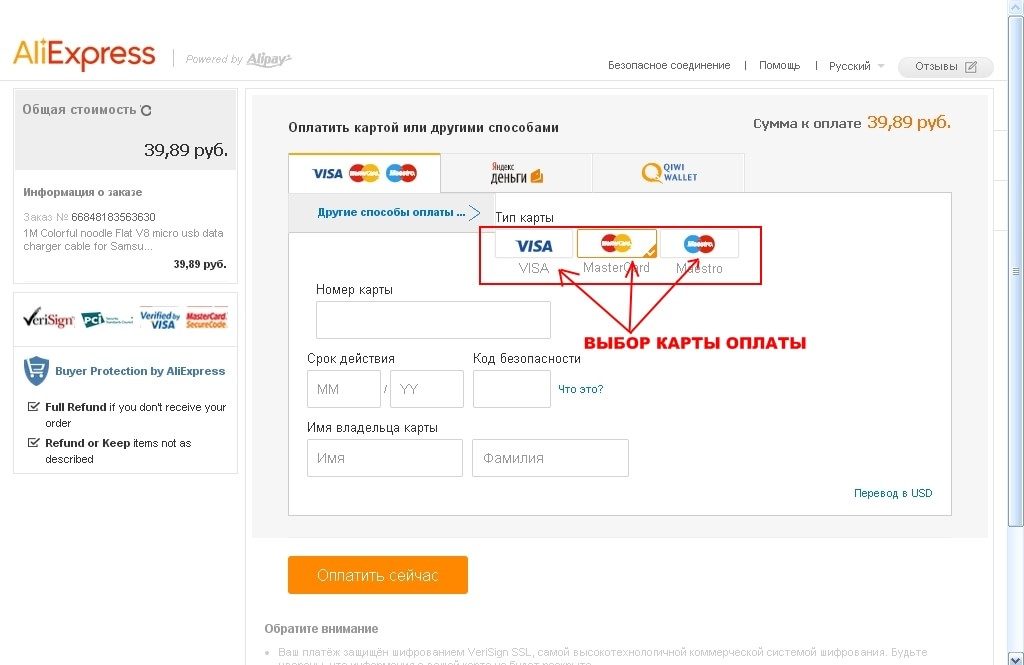
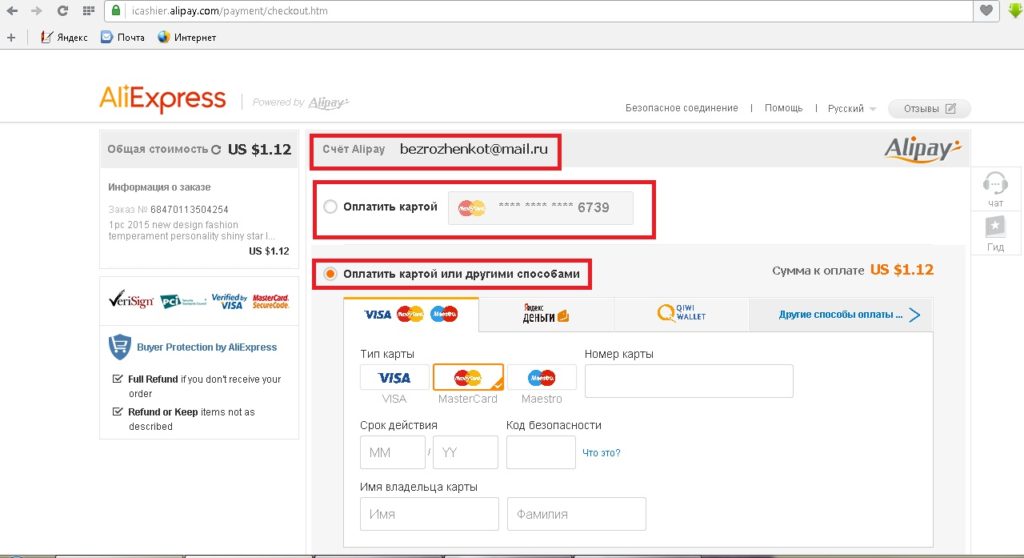
Now the Russians can pay the order of the map of their national system. It is very convenient and will not require a separate release of another card. Such an opportunity appeared since the autumn of the current year, thanks to the cooperation and high percentage of consumers from our country. The entry of the card is carried out when paying for the goods, and not separately. So, you choose a specific thing and made an order. The next step will be the payment of goods. In the payment window, we need you to "pay for a bank card" and then choose the payment system corresponding to your credit card. Their list can be found in the column on the left side of the page.
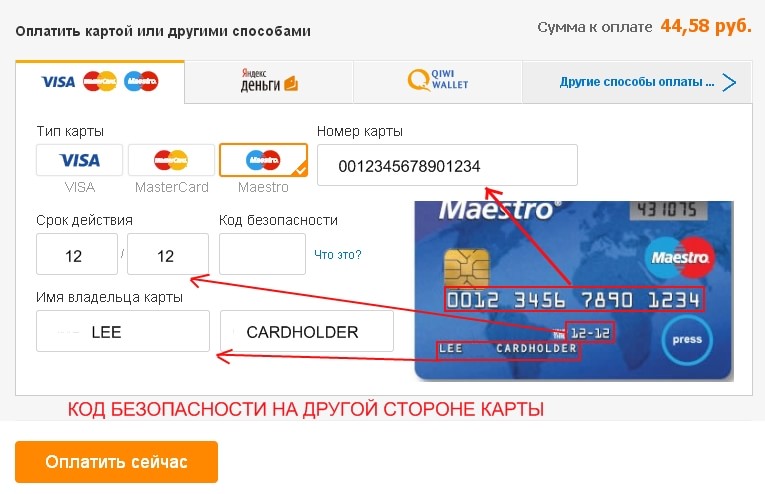
After that, fill information from the card, namely:
- surname and name;
- card number;
- validity;
- protective code from turnover (consists of three digits).
Be careful when data enters. If the error is inspired, the payment will not pass. Now you can safely click the "Pay order" button. That all data of the bank card introduced.
How to tie a bank card on Aliexpress?
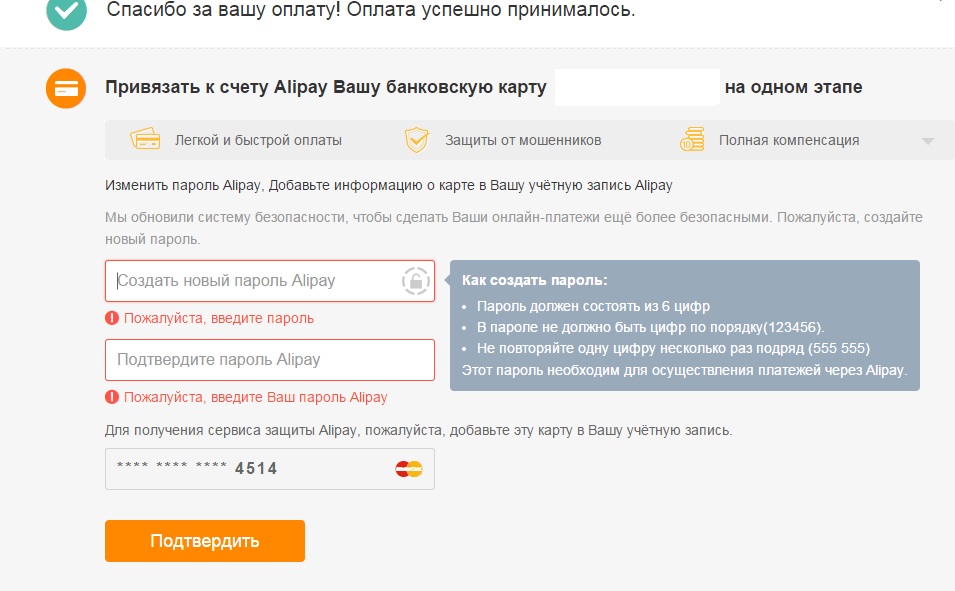
Recently, the card binding service has been available on Aliexpress. True, people who have already paid for the purchase of the card can take advantage of it (at least one). The map is tied to the payment system AlipereyThrough which all payment transactions are performed on the trading platform. When performing operation, the user will be offered to tie a map. With the consent you press the appropriate button and a message comes to your phone number to your phone number. After entering the received password, the user will see a message. about successful Conducted operation and binding wallet. After that, you need to enter your card data so that the system saves them. This service has its pros and cons.
To the positive parties can be attributed:
- do not need to enter data on each purchase;
- password send to the user when paying for the order;
- guaranteed reliable protection of personal data.
As you know, any information in the World Wide Web can be stolen, databases are opened. And this is the main negative factor. If the client notices the appearance of operations that he never performed and from the account The funds will begin to be departed, the administration of the resource does not guarantee that all measures will be taken to prevent such and compensation for material damage. It is very sad. Before tie the map well, think solution Accepts each independently.
How to change a bank card on Aliexpress?
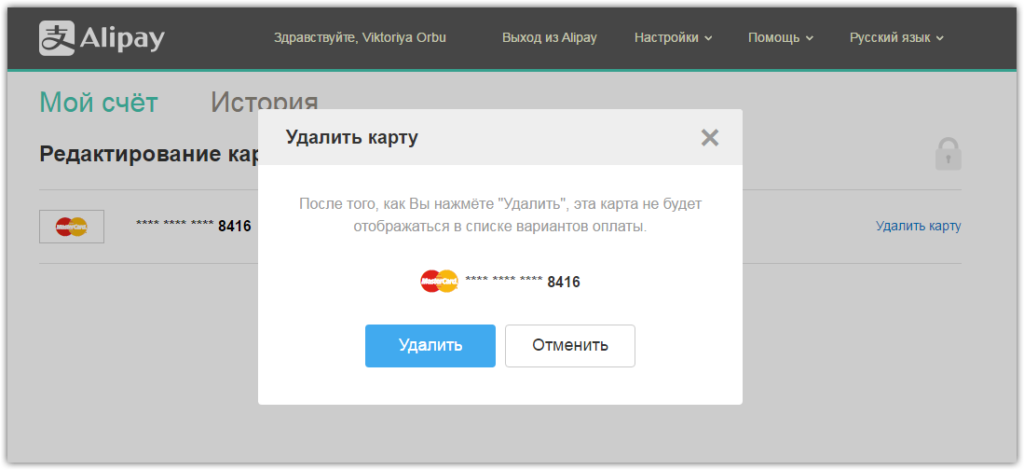
If the term of your card has expired or you want to pay for the purchase by another credit card, you will need to change the data. To do this, in the "My Aliexpress»You will need to find "My Alipay". If your account is not activated fill the fields in the form. After that, an email will come to an email on the link in which you need to go to activate the account. After that, the window opens Aliperey In which you want to find the "Edit Maps" tab. In the window you will see the map number and opposite the "Delete" button. After pressing it, the system will ask for confirmation of your actions. Click "Delete". Now you can enter the data of the new card.
In addition, you can change the data and when paying for goods. Doing this on the payment page, select the item "Pay for a card or in other ways." Now choose the new card payment system and fill in all fields of the form. If you wish, you can attach this card.
This article tells about attaching the map K. Aliexpress and entering its data. Taking advantage of the information of the article You can write these card data, and if necessary, change the map. Enjoy the shopping.

