How to pay aliexpress through Sberbank online

By purchasing goods from the Internet Resource Most pays using electronic wallets or online banking. Often problems arise. In this article, tell me how to pay for your order for Aliexpress And avoid problems.
Contents.
- Safety and protection of the buyer for Aliexpress
- Payment for Aliexpress through Sberbank Online (detailed instructions)
- Possible problems with Sberbank maps as they solve
- Payment does not pass, pops up a payment error, its causes, solutions
- Payment through Sberbank Cash in the Terminal (step by step)
- Payment from the WebMoney Virtual Wallet
- Payment through kiwi wallet
- Payment via SMS from the phone
- The most convenient way to pay for customer reviews
Security and protection buyer on Aliexpress
Safety of shopping by shopping ground It depends not only on the administration of the resource, but also from the notorious human factor.
The buyer's protection can be divided into three sections:
- rating seller;
- basic guarantees;
- extension protection order, opening spore.
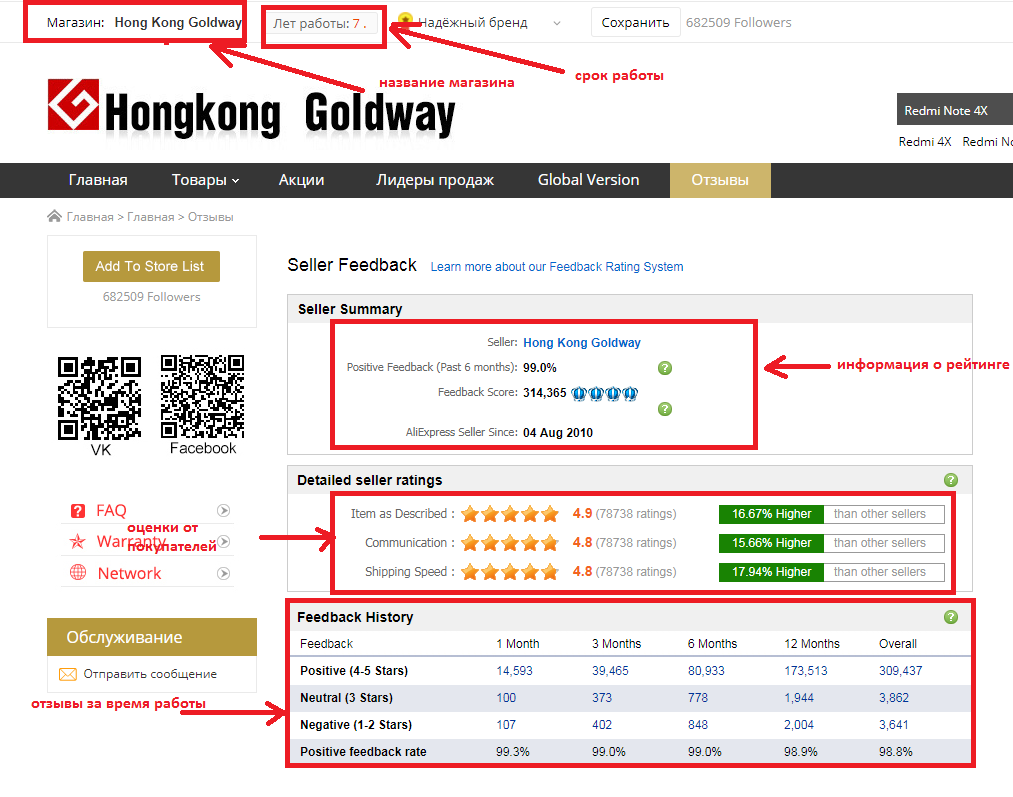
To secure the consumer from the unscrupulous seller was introduced ratage system. After reading him, everyone makes conclusions for himself. The rating of a particular seller can be viewed on the product description page. In the upper line, the name of the store will be indicated, the life of its work and rating. This data is also duplicated and located under the photo of the thing on the left side. Moreover, the rating is indicated by numbers and graphic symbols (coins, diamonds, crown). When you click on the image next to the rating, a page with a detailed history of the seller will open, where, besides the aforementioned data, you can familiarize yourself with the average valuation of the store's work, which is set by the buyer on a five-point scale. In addition, here you can review the reviews for all the time of its work on the resource. Moreover, they are displayed on all goods presented at the merchant.
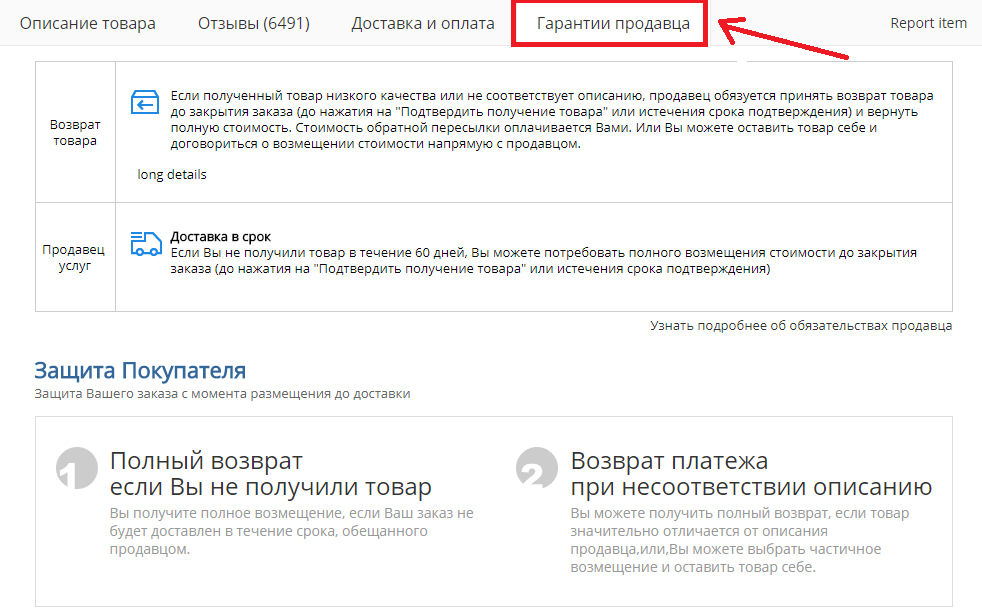
Besides the seller provides its guarantees which can be viewed in the tab of the product name on the product description page.
Safety on the site is provided and basic guarantees (Timely delivery and refund). The longest deadline for the delivery of goods to our country is 90 days. His failure to comply with this one hundred percent refund.
There are nuances that cancel this rule:
- error v mail address;
- unforeseen situation ( not passed customs control, catastrophe and t.d..);
- payment products directly seller, a not across services Aliexpress.
Last happening not profitable both, after all dealer receive funds only after confirmation delivery, or on expiration time delivery.
The parcel did not come, and the delivery time will soon expire. The first reaction is an excitement. Write the seller without delay to increase the delivery time. This can be done in the order card by clicking on "requesting the extension of the buyer's defense" (blue font). If the seller goes to a meeting, you will see it on a time counter. Otherwise, you will have to wait for the end of this period and open the dispute with the requirement of returning the order price. This can be done on the same page by clicking on the "Open Spore" button. Administration Aliexpressrises on the side of the consumer, so you can not worry about return.
Payment on Aliexpress across Sberbank online (detailed instructions)
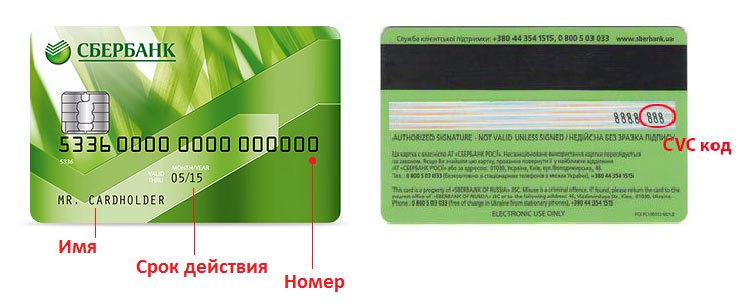
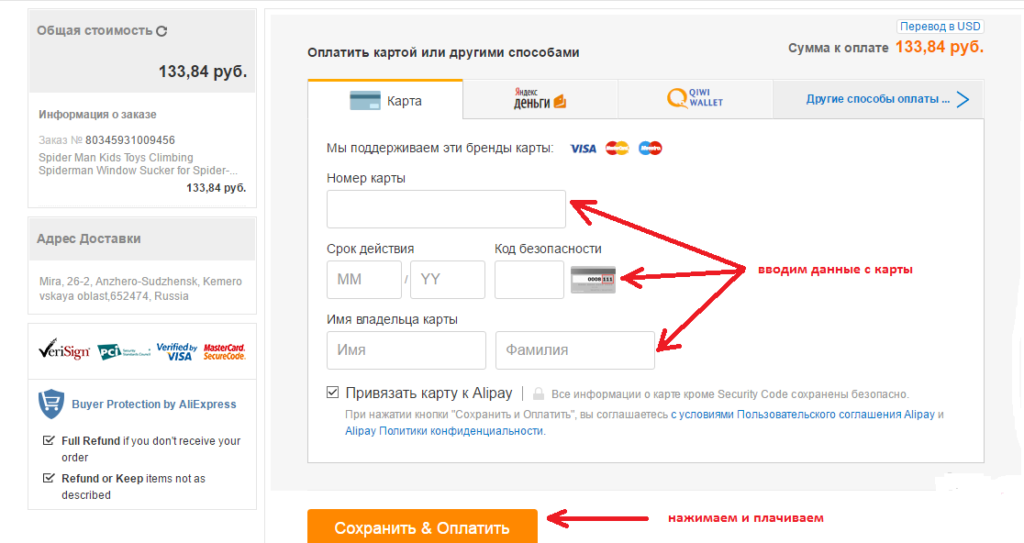
You chose the desired product and its need to pay. To do this, on the product page, click "Buy Now". Payment will be happeningonline with Sberbank card. A window in which a few tabs have opened in front of us, we need a "card". After the transition to it, you must fill in the following fields:
- room cards;
- term actions;
- code security ( 3 numbers with turnover cards);
- initials owner.
Further press « Save Pay». Payment passed successfully, remains wait parcels.
Possible problems with Sberbank maps as they solve
With properly entered data, the payment error may exit.
This may be for several reasons:
- problem v banking programs;
- problem sO parties buyer;
- problem with payment system trade places.
First of all, you need to call the Sberbank hotline or write an online consultant. You need to find out if you are connected to your account with the possibility of payment via the Internet and there is no limit on the amount of shopping. Also pay attention not to expand whether the map. If there are no problems at this point, clean your browser's memory. Performing these actions should help.
Payment not passes, pops up error about payment, her causes, path solutions
At payment purchases maybe log off error, which easily to correct, knowing her code.
Often the following:
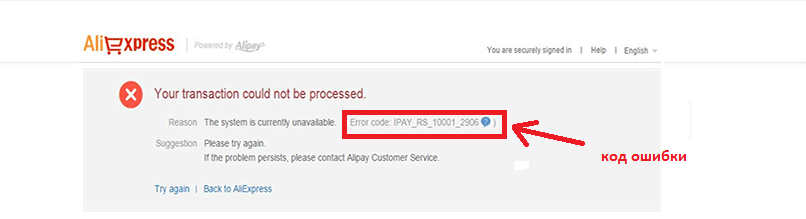
- Ipay._RS_10001_2606 — map rejected bank, necessary verify her reality;
- Ipay. RS 10001 2618 – overload network;
- Ipay._RS_10001_2616 – lacking of money on account, replenish his and repeat attempt;
- Ipay_rs_10001_2618. - Payment is not performed, this often happens with the maps of a visa of an electron and maestro, to solve the problem, you need to call the bank and find out whether it is possible to pay off the card on the Internet;
- Pay_rs_10001_2626. - The purchase amount exceeds the card limit set by the Bank, here you can enter in two ways: to call the bank and ask to increase the limit or pay in another way;
- Ipay_rs_10001_3007. - the wrong card number, it is necessary to check whether the correct data is introduced that the card is valid if these measures have not been successful to call the Bank's support service, the number is usually applied on the back of the card;
- Ipay_rs_7777 - The payment cannot be temporarily processed and was not performed, such a situation often occurs in a mobile application. To solve it, update it and try again. You can try to pay the order on the computer if this error has been released. Repeat in another browser.
it malaya part codov errors. Knowing o them can prevent similar situation.
Payment across Sberbank cash v terminal (step by step)
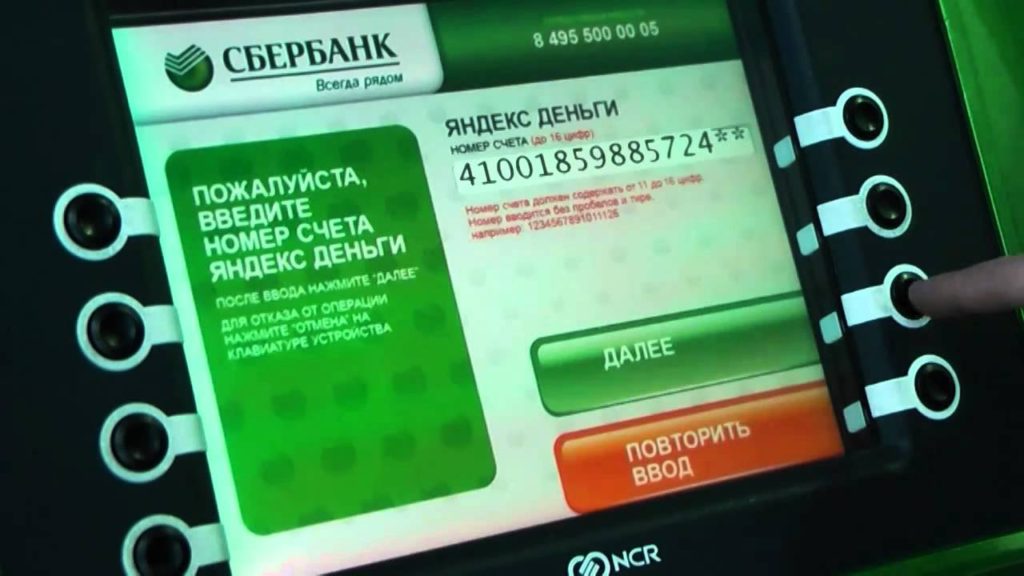
Yes, this option is possible. We need to choose the product and go to payment. Here in the window you need to select the section "Other Payment Methods", after which the window will open in which I choose "cash payment". Now enter your phone number in the window and click "Continue". Next, a message will come to the phone with the order number. Now we go to search for the terminal. Mandatory condition is the presence of the Yandex Money e-wallet. In the Device menu, select the "Yandex Money" section, "Cash". After that, in a special field, enter the phone number or account number of the wallet. A message will come to it with a code that we enter in the Sberbank terminal. If there is a sufficient amount of money, the operation will be successfully completed.
Payment with virtual wallet WebMoney.
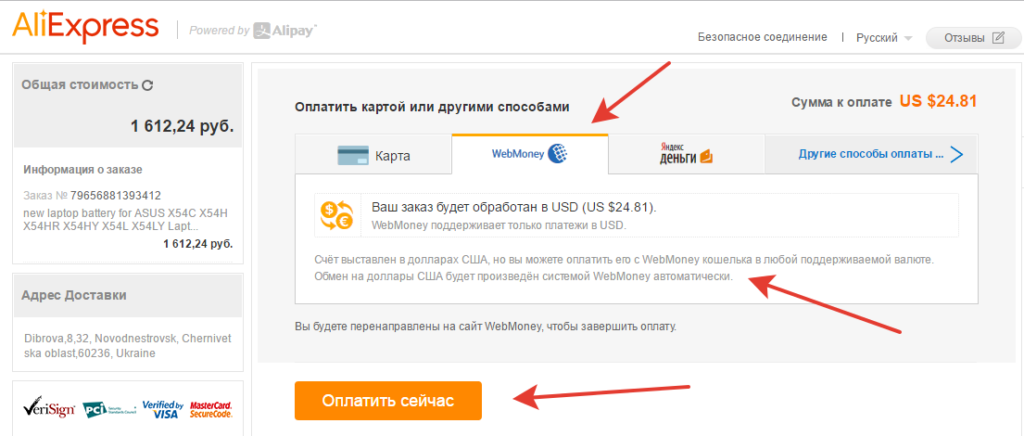
WITH recently of time pay order can and with wallet WebMoney. For this in the "Payment method" column you need to select "WebMoney" and click the "Pay order" button.
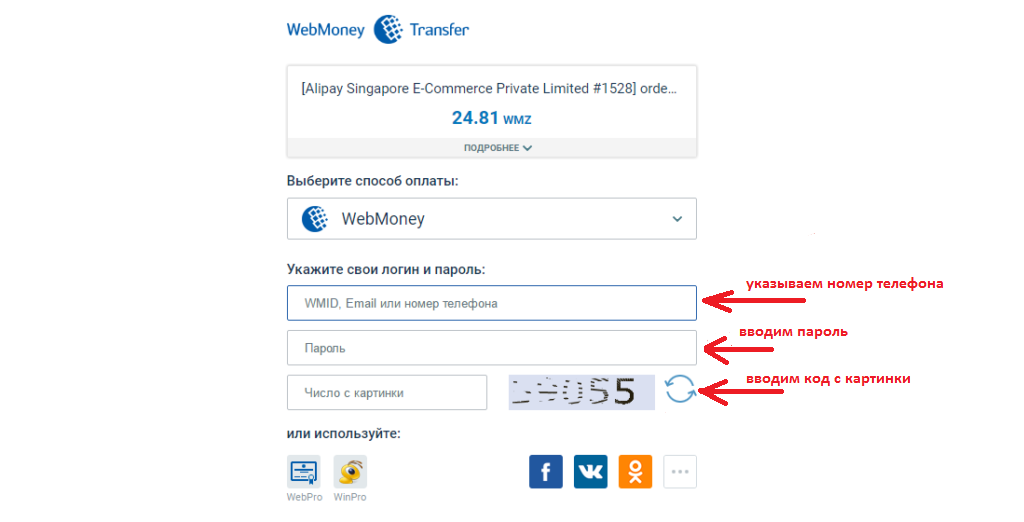
After that, the window of this electronic wallet opens. It is necessary to enter your username and password, in addition, the system can request a disposable password that will come in a message on the phone. After his introduction, you can pay for the goods.
By the way, this calculation system is recognized as the most reliable payment method on the Internet.
Payment across Kiwi purse
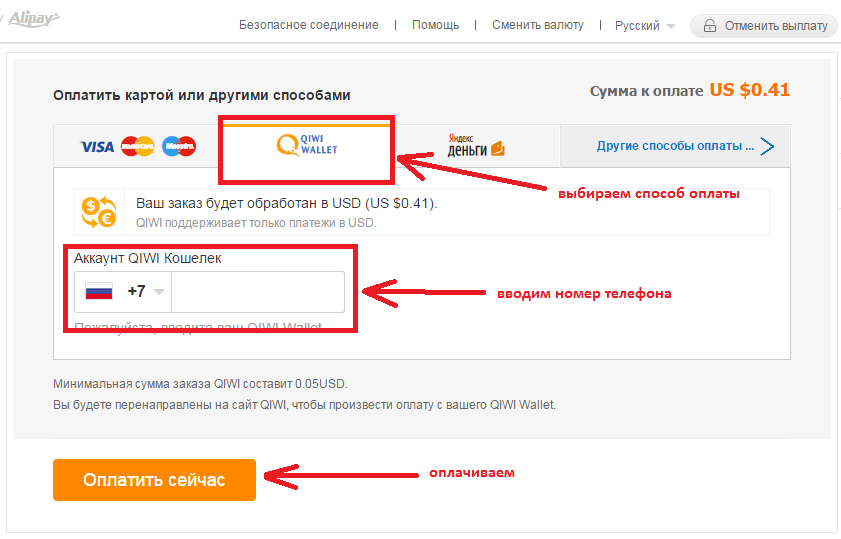
To pay this method in the window it is necessary to choose in the payment methods of QIWI wallet.
After that, in a special field, you need to fill the field with the phone number to which the wallet is tied. Click "Pay Now" after which the transition to the Kiwi site and end payment. With proper action, the payment is going fast.
Payment across SMS with telephone
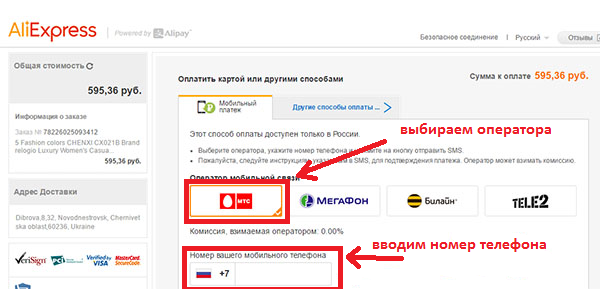
Order by Aliexpressyou can pay from a mobile phone. Comfortable! It is done easily, at the last step of the purchase of the purchase, choose "Other payment methods" and "Mobile Payment". Also enter your mobile network operator and specify the phone number.
Prev payment Make sure in sufficient money on the balance and only after that we pay for the purchase. The disadvantage of this method is the Commission, which must be added to the cost of goods.
For each operator, their tariffs are installed:
- MTS – 0,95%;
- Megaphone – 1,95%;
- Beeline – 3,9%;
- Tele 2 – 2,45%.
The most convenient way to pay for customer reviews
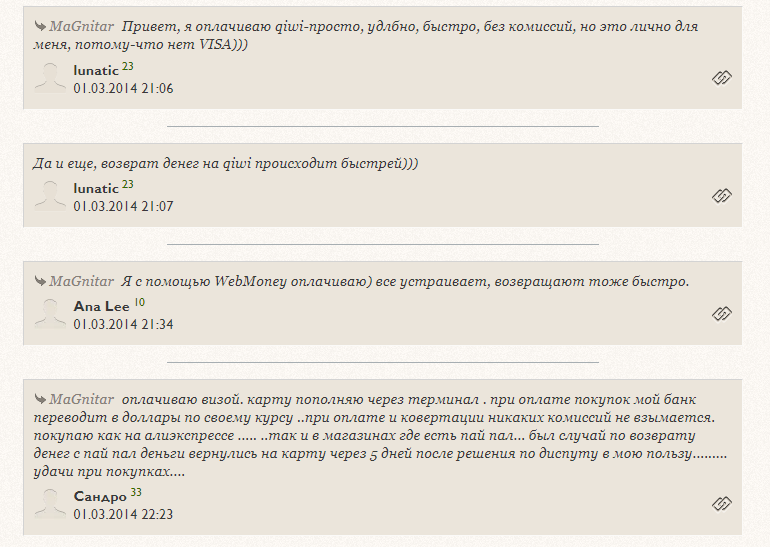
With regard to payment for goods on the trading platform, the majority preferred in two ways:
- with the Internet wallet ( kiwi, webMoney and t.d..);
- banking card.
According to people, these are fast and reliable payment options. And it is officially recognized that it is safe to pay from electronic wallets, because Data passes several degrees of checks and securely encrypted.
V this article tells what kind guarantees provided buyer on Aliexpress. Examples of various types of payment with instructions are given. Taking advantage of the information of the article, you can choose the best way to pay and produce it in the shortest possible time. Enjoy the shopping.

