How to tie a payment card Aliexpress? How to change the attached Aliexpress card?

Huge number of customers mass market Aliexpresswe chose for yourself the most convenient view of the payment plastic card. This is due to the fact that it is not necessary to pay extra commissions, as well as the fact that the currency conversion is carried out at the rate of the bank, and not by the imaginary course established in some payment systems. However, no time I want to introduce data from the card and spend your precious time on this operation, so you can simply take and attach the map to your account on Ali. In this article we will show you how it can be done.
Contents.
Aliexpress how to tie a payment card?
The priority for you will be creating an account on the shopping site. How to do this, told in this article: " How to register for Ali". After creating an account, you need to go to it. Then Mouse over the mouse over your name, the window will pop up in which you choose "MY ALIEXPRESS".
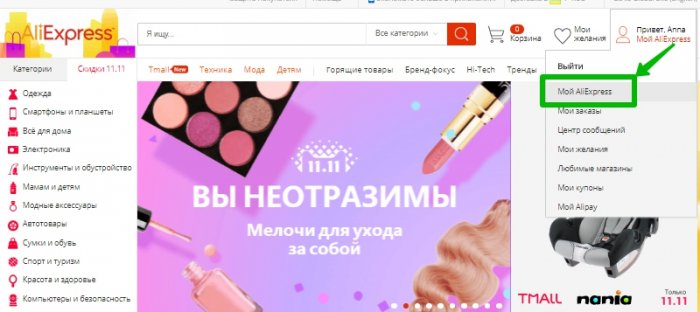
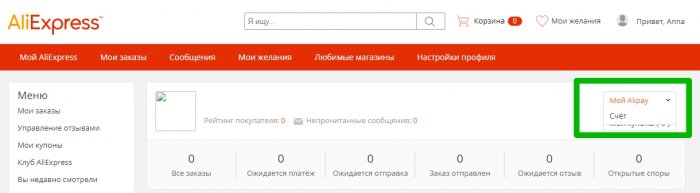
Next will open the menu in which you will have a different kind of possibility. We find in the right corner a small tab "" My Alipay "and in a small pop-up window click on the" Account ".
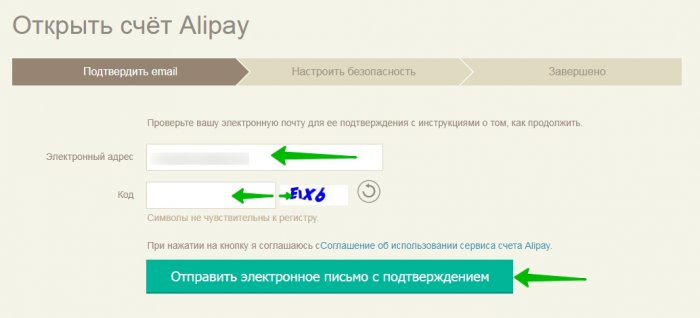
After that, you will send you to the Alipay page, where you need to enter the code from the picture and receive a letter confirming the e-mailbox. In it follow the instructions and confirm your intentions.
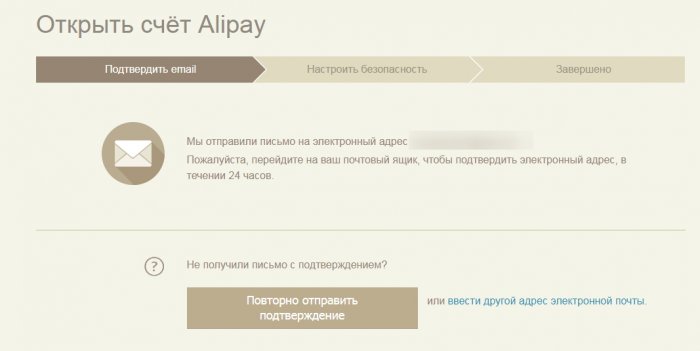
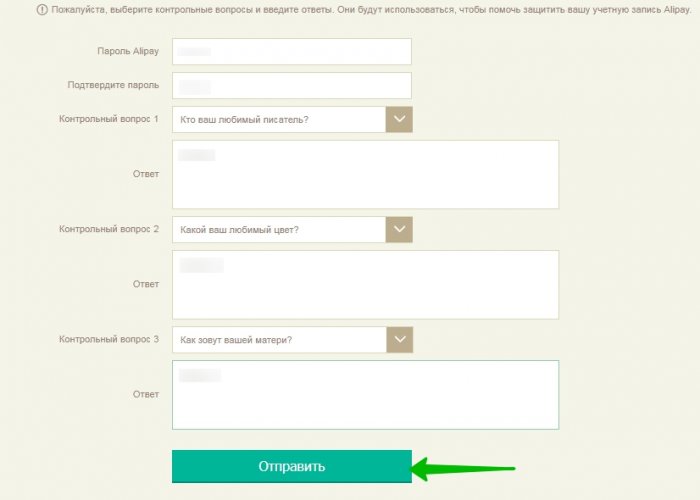
After your confirmation, you will need to set the password to enter the Alipes and specify the answers to the control questions. Click "Send".
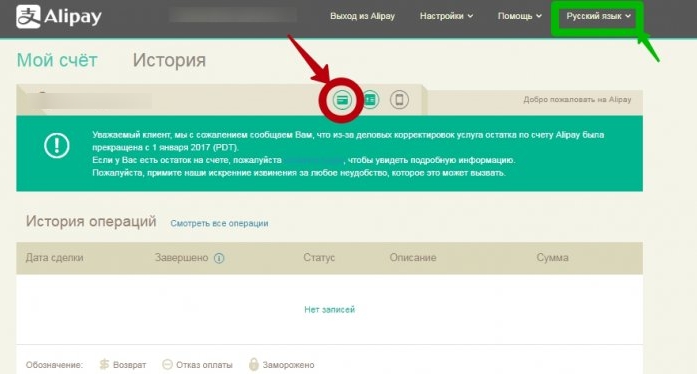
After sending, a window will simplify in which you can replace the language. Now the interface will become much clearer. Click on the map icon. Since the account we only have made and cards are not yet, you will see a notice of the screen in the center of the screen, and the "Add Map" button above will be at the top.

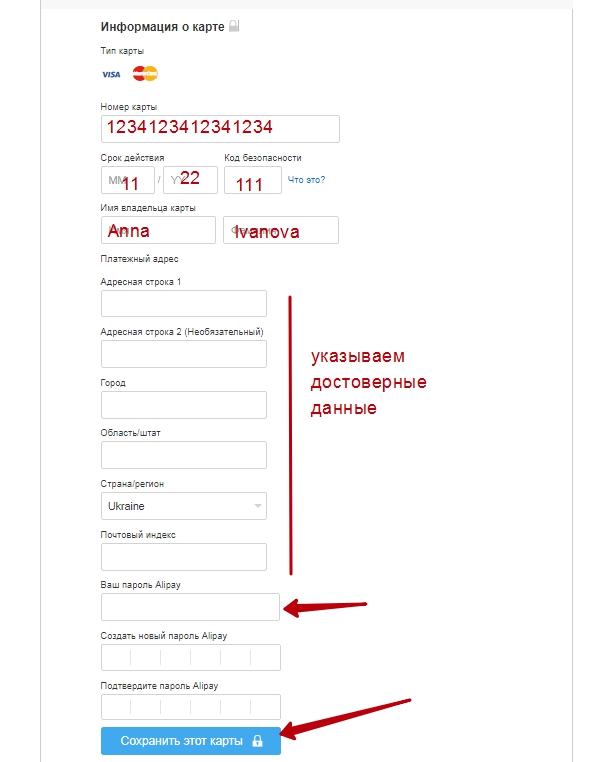
Take our card and start correctly filling the fields. Enter only reliable information, since the data will be checked by the system. Fields fill in Latin letters. If you do not know how to do this, then use the translines on the network. Click "Save this card".
Note! After you have saved the card, the amount of 1 cents will be frozen on her account. As soon as the card is confirmed, this amount will be disgraceed.
We are waiting for a day, and the card will be tied to your account.
How to remove a tied card on Aliexpress
For this procedure, it is necessary to go to Alipes. We do it in the same way as we did during registration. My Aliexpress\u003e Alipei\u003e Accounts\u003e Card Editing. Since the card has already passed the check, it will already be displayed. In our case, a visa map is used. Opposite the card indicates your name and surname, and a little further the "Delete Map" icon, then we press it.
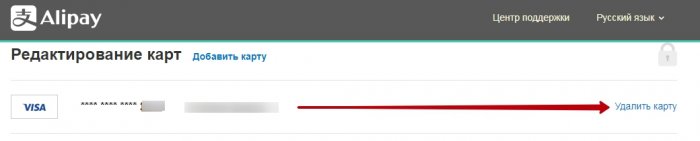
The benefit of the interface is designed so that you have to repeat your actions by clicking on the "Delete" button.
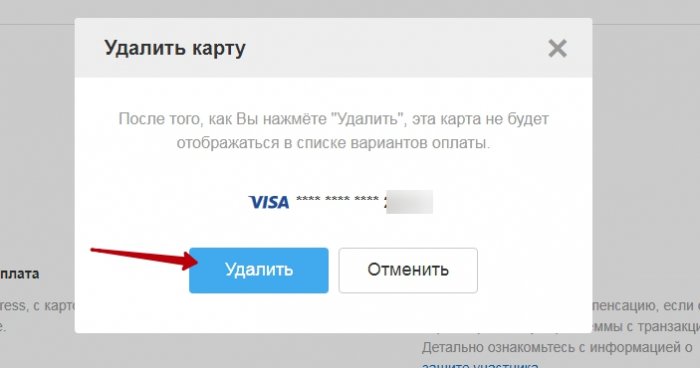
Thus, the card will no longer be tied to your account. The same card, if desired, can be tied again.
How to tie a map to Aliexpress without Alipei
If for any reason you do not want to fool your head with all sorts of alipes, then you can do and otherwise. We go to the site, choose your favorite version, select its parameters, etc., press the button " Buy now"Or, as an option, send to the basket, if this is not the only purchase today.
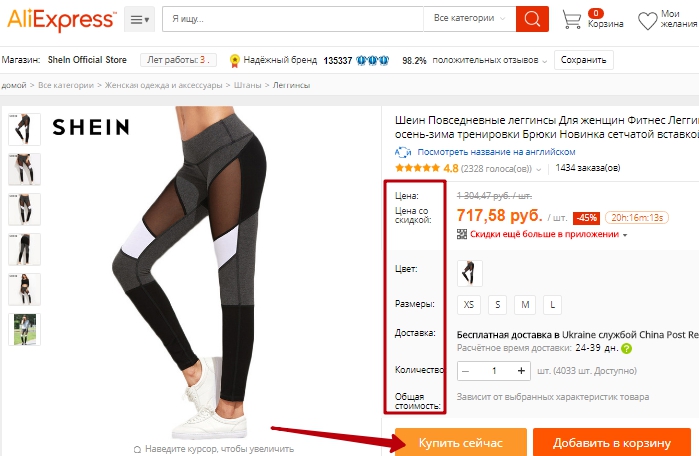
We draw up the delivery address, enter the acting address in Latin letters. The index also needs to be specified correctly, so that your parcel does not furrow the expanses of the country. Save data.

Then additional steps will open below. Third step - payment. The machine shows that you can use the map. We enter the card in the field, unforgettable, indicate the correct security code from the inside of the plastic. Click "Confirm and pay".
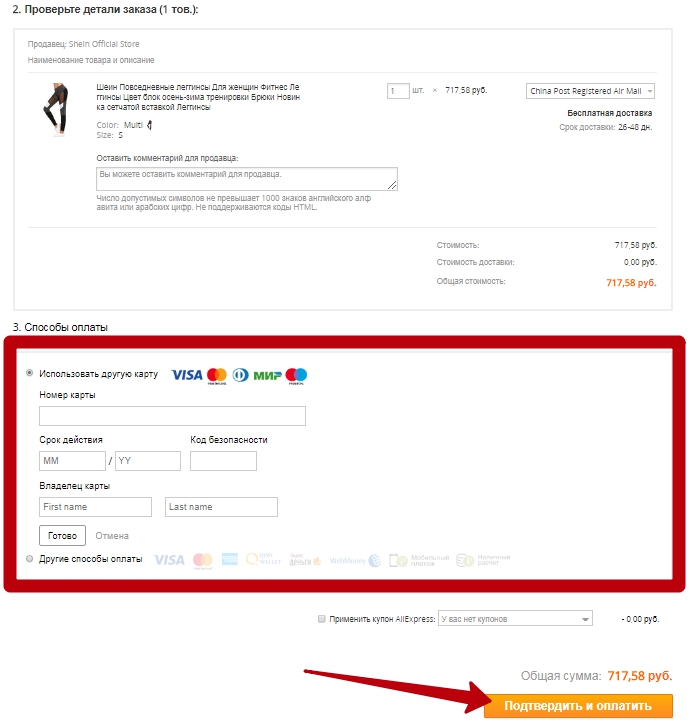
Then we make payment. The site itself is designed so that remembers the maps from which the payment was performed. Thus, the carat will be saved and you do not have to enter data every time, as well as it will not be necessary to spend time on Alipes.
How to change a tied card to Aliexpress
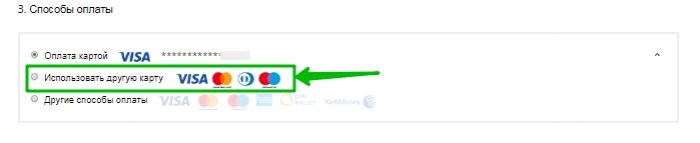
Change the map as follows. Make all the same steps that were done in the point above and stop at the moment. ordering. In the payment methods, find the map, and on the contrary there will be a button "Use another map", click.
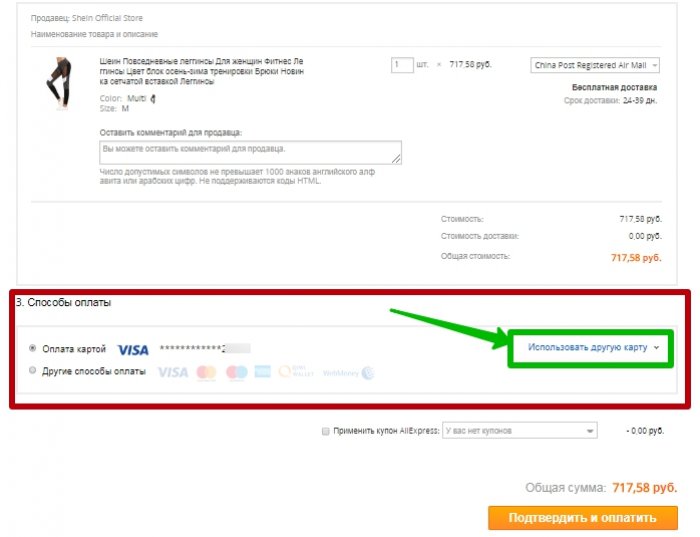
Choose the second point.
Enter data of the new card.
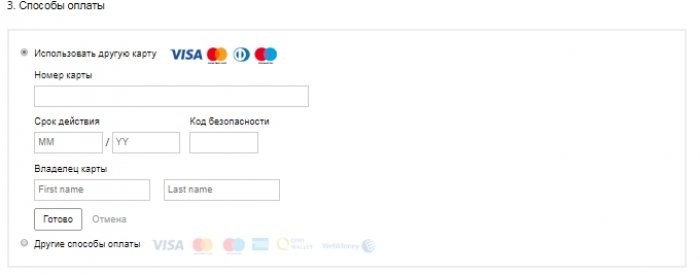
Confirm payment.
How to tie a map in an aliexpress application
We do not always have access to the desktop PC, so most of the shopping lovers at Aliexpressthere was a place in the phone's memory to the application. The scheme for adding a map through the application is very similar to the one as on the official website. We choose the goods, then click on the "buy" button.
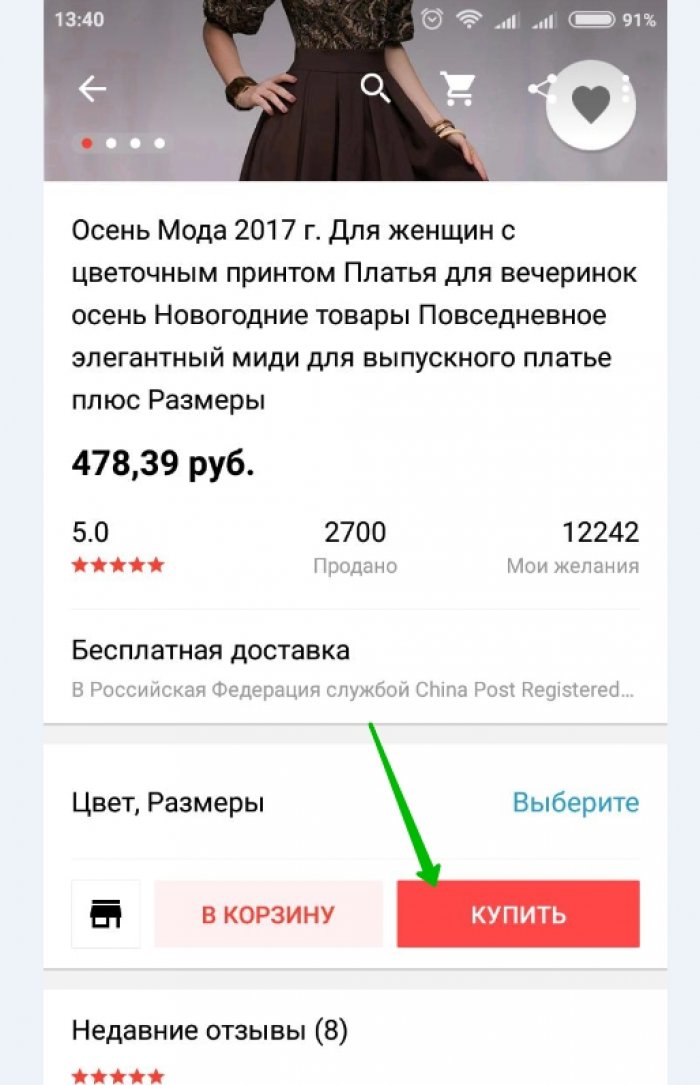
We select the parameters. We click to continue.
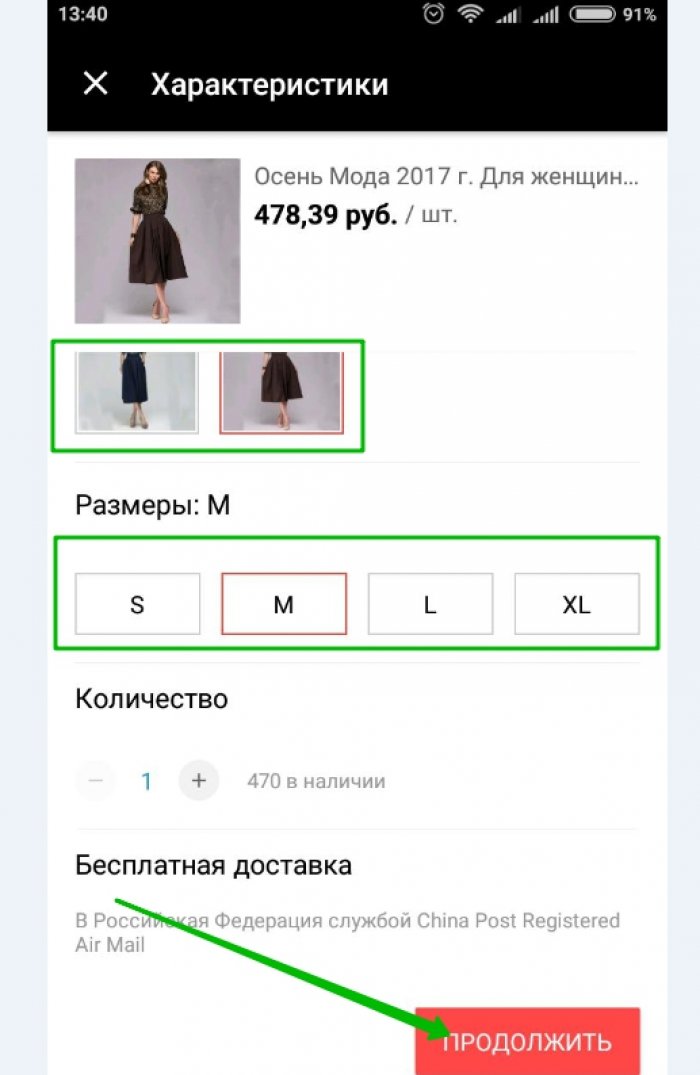
The application will open the new window in which the shipping address will be specified, as well as payment methods. Since the map has already been tied, it is displayed, you will have payment methods, choose a map. In our case, we change the map, so click on "change".
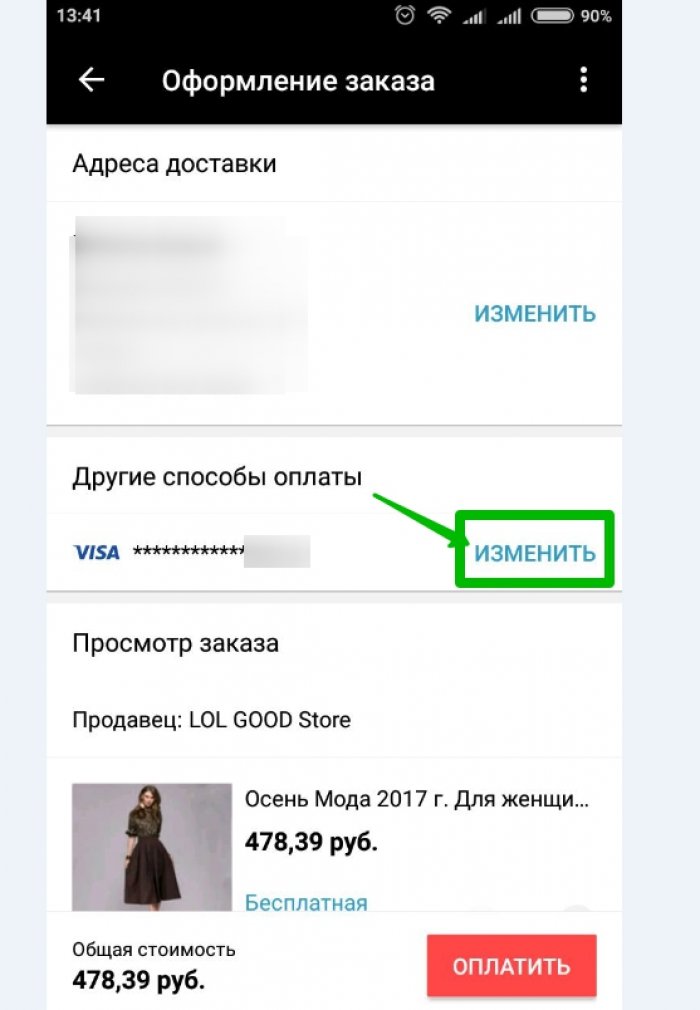
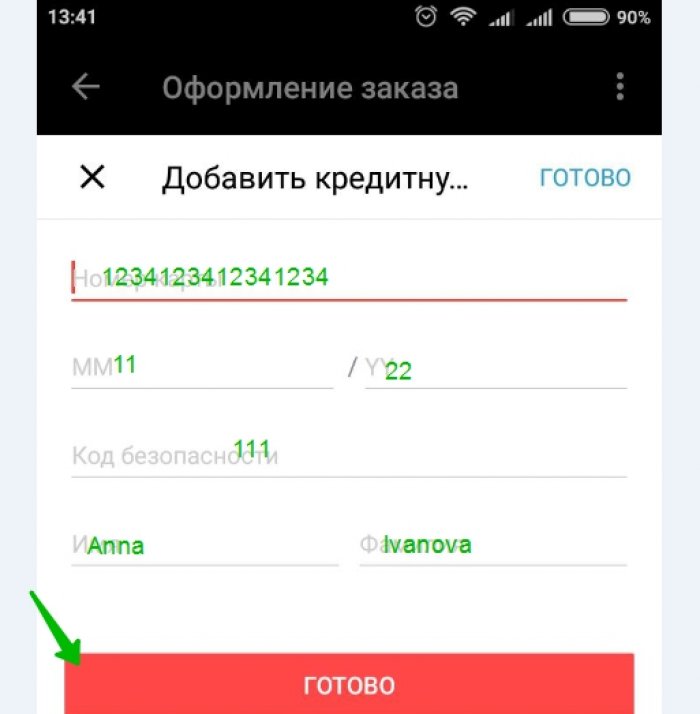
The menu for data entry does not differ from those on the PC. We enter them and click ready. Everything, nothing else to do. After payment, the card will be tied to your account.
How to bind the second map on Ali Spress?
You can bind the second card, like through Alipes, going into the maps section and adding a new card according to the already described scheme in the sections above and through the purchase. As already mentioned site I remembers the entered payment data and you will not have to enter them again. It will only be enough to choose the desired card from the list.
Is it safe to tie the map to Aliexpress?
For all of us, financial security is above all and there are such people, which do not want to shine with their card accounts, so they choose alternative ways of payment of goods not only in Chinese online venues, but also on any other network stores. Tie card k Aliexpressrelatively safe. Let's explain why. If you think that your accounts sees the Chinese seller and will be able to turn out some fraud, then you are very mistaken. Nobody sees your card except Aliexpress.
However, there is a certain risk. Your data can be supported, only do it not Aliexpress, For example, the virus, Troyan, and you will help him. This happens like this: the virus settled on your device, you seem to go to Ali, only the address of the site can be slightly changed, and we, as a rule, do not specifically give this value. Next, you enter the data of the cards, but then you do not need to describe the situation, no money or the goods.
In addition, fraudsters are increasingly swaying to the site itself. This Machination is called "Social Engineering". The seller himself writes you that he has failed there that the goods are not sent, and he is so generous wants to return you money and also the amount more larger than you have been spent, bypass Aliexpress, allegedly valid about its reputation. In return, he asks you to put high points. For this, he asks you to send payment card data including security code. Do not do this.
Is it safe to carry out a binding the question of the controversial, as is safe to leave the house. In this case, you can only say what you should carefully treat every stage of purchase, watch on the official site you or not ( https://ru.aliexpress.com.) And do not report our payment details to the Chinese. In the case of opening a dispute, the Chinese merchant sends you money, but Aliexpresswho acts as a guarantor of a secure deal.
How to pay the card, shown on the video.

